A chart that reads the way you crochet
One square is one stitch (or one C2C block). Rows are numbered from the bottom, every tenth line is bold, and you can switch on letters for printing in black and white.
Turn a photo into a flat crochet pattern: a color chart, written row-by-row instructions and a yarn shopping list, for graphgan, C2C or tapestry crochet.
Drop a photo here, or choose a file
JPG, PNG or WebP. It never leaves your browser.
Makes flat color charts for blankets, pillows, wall hangings and bags. It does not write amigurumi (stuffed toy) patterns.
No photo handy? Try one of these:
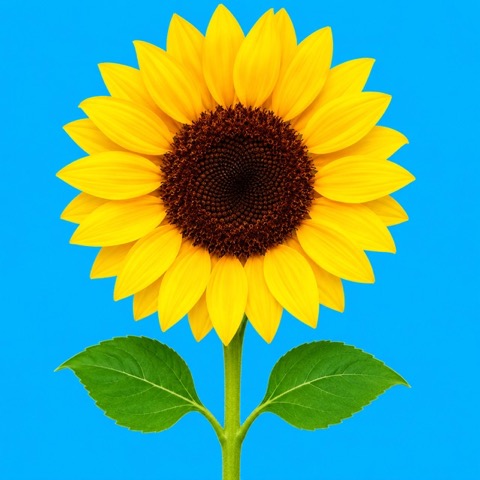 1. Your photo
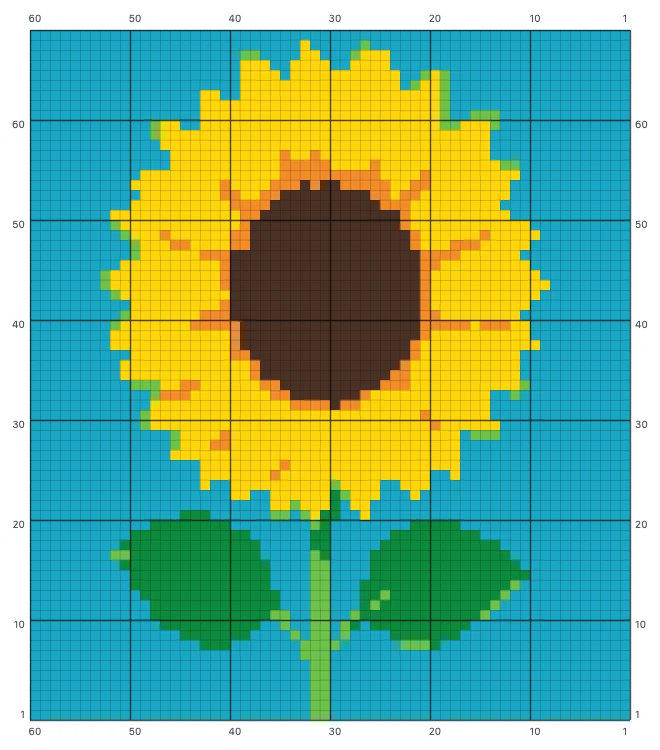 2. Color chart with row numbers
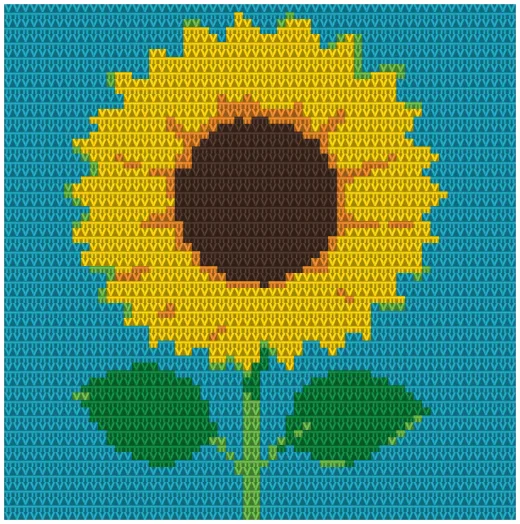 3. Stitched preview (simulated, not a photo of real fabric)
Outlined squares are what you crochet now. Ticked squares are done, faded squares come later.
Going from photo to crochet pattern takes three steps and about a minute. This crochet pattern maker needs no account and no design skills.
A pet, a face, a logo, a child's drawing. Clear subjects on plain backgrounds give the cleanest charts. The photo is read by your browser and is never uploaded.
Choose graphgan rows, C2C or tapestry, then drag the width slider. The finished size in inches updates from your gauge, so you can see whether you are making a pillow or a throw before buying yarn.
Open Crochet along and the page tells you what to do next: how many stitches, in which color, and when to switch. Or read the chart or the written rows. Your place is saved in your browser.
A picture of a grid is a crochet graph, not a pattern. You still have to count every square, work out which direction each row runs and guess how much yarn to buy. This crochet pattern generator does that work for you, and the printable PDF is free.
One square is one stitch (or one C2C block). Rows are numbered from the bottom, every tenth line is bold, and you can switch on letters for printing in black and white.
Every row is spelled out as color counts in working order, such as Row 4 (WS) → A×12, B×3, A×45. Right-side and wrong-side rows are marked, and C2C rows say whether to increase or decrease.
Photo conversions leave single stray stitches that each cost you two yarn ends. The clean-up slider removes them, and the summary shows the total number of color changes so you can compare settings.
Match the colors to Red Heart Super Saver, Caron Simply Soft or Stylecraft Special DK, swap any shade for one you already own, and get estimated yards and skeins for each color.
Crochet stitches are not square. A double crochet is nearly twice as tall as it is wide. The row count is calculated from your gauge, so a round face stays round.
No counting squares. Each step says something like 12 sc in Jade, then switch to Pumpkin, with a close-up of where you are. It can read the steps aloud and keep your screen on while your hands are busy.
Switch the chart to Stitched look to preview the piece as crochet fabric at your gauge, so you can judge the colors and the true proportions before buying yarn.
Switch on Edit stitches to repaint squares, clean up an eye or simplify a background. The written rows and yarn totals update with every change.
The same photo becomes a different project in each technique. The generator changes the stitch gauge, the reading order and the written instructions to match.
| Style | How it is worked | One square equals | Best for |
|---|---|---|---|
| Graphgan rows | Flat, bottom to top, turning every row. Right-side rows read right to left, wrong-side rows left to right. | 1 single crochet (or hdc / dc) | Detailed pictures, portraits, wall hangings |
| C2C (corner to corner) | Diagonal rows of blocks from one corner to the opposite corner, increasing then decreasing. | 1 block: ch 3 + 3 dc | Blankets that grow fast, bold simple designs |
| Tapestry | In the round without turning. Every round reads the same direction and the unused color is carried inside the stitches. | 1 single crochet | Bags, baskets, cushions, hats |
Mosaic and filet crochet follow different rules (two colors per row, or open and filled mesh), so they are not offered here yet. A photo forced into those techniques rarely works without redrawing.
Width in stitches decides both the detail and the finished size. These figures use worsted-weight yarn at a typical gauge of 14 single crochet or 5 C2C blocks per 4 inches. Enter your own gauge under More options for an exact size.
| Project | Finished size | Single crochet rows | C2C blocks |
|---|---|---|---|
| Wall hanging | 12 × 12 in (30 × 30 cm) | 42 stitches × 48 rows | 15 × 15 |
| Pillow front | 16 × 16 in (40 × 40 cm) | 56 stitches × 64 rows | 20 × 20 |
| Baby blanket | 30 × 36 in (76 × 91 cm) | 105 stitches × 144 rows | 38 × 45 |
| Throw blanket | 50 × 60 in (127 × 152 cm) | 175 stitches × 240 rows | 63 × 75 |
Image models produce pictures that look crocheted, and text models produce instructions that sound right. Neither is counted from a real grid, so stitch counts drift from row to row and the piece will not come out as shown. Here the chart is computed from the pixels of your photo, and the written rows are counted from that same chart. The numbers always add up, and the same photo with the same settings gives the same pattern every time.
Yes, all of it. The chart, the crochet-along steps, the written row-by-row instructions, the yarn list, and the PNG and printable PDF downloads are free. There is no account, no sign-up and no watermark.
Upload the photo, choose graphgan rows, C2C or tapestry, then set the width in stitches and the number of colors. The generator maps the photo onto a stitch grid, reduces it to your chosen number of yarn colors and writes out every row.
Both. Every row is written as color counts in the order you work them, for example Row 4 (WS): A×12, B×3, A×45, with right-side and wrong-side rows marked and the reading direction shown.
A graphgan worked in rows uses one single crochet per square and is turned every row. C2C (corner to corner) works diagonal rows of small blocks from one corner to the opposite corner. Tapestry is worked in the round with the unused color carried inside the stitches, which suits bags and baskets.
Divide the width you want by your stitch width. In worsted yarn, single crochet is about 3.5 stitches per inch, so a 30 inch baby blanket is about 105 stitches wide. In C2C, blocks are about 0.8 inch, so the same blanket is about 38 blocks wide.
Yes, if you start small. Click Use beginner settings for a 40-stitch, 4-color pattern in single crochet, then open Crochet along. It walks you through every row, tells you when to change color and explains each stitch in plain words. A full-size photo blanket has thousands of stitches, so make a small square first.
Start with 5 to 8. Fewer colors mean fewer ends to weave in and less yarn to buy. Portraits and pets usually need 8 to 12 to keep the face readable.
Yes. Switch between US and UK terms under More options. A US single crochet is a UK double crochet, so the written instructions change with the setting.
They are estimates. Shade names are the makers' own, but screen colors only approximate real yarn, so check shades in person before buying a full set. Yardage is based on typical stitch lengths plus a 10% allowance. Crochet a small swatch if your project is large.
No. The photo is processed in your browser and never leaves your device. Your last pattern is saved in your browser so it is still there when you come back.
No language model writes the pattern. The chart is computed from the pixels of your photo and the written rows are counted directly from the chart, so the two always agree.
Yes, if you own the photo or have the right to use it. The pattern is yours. Characters, logos and other people's artwork remain their owners' property.